How to Check if an Image is Copyrighted: The Complete Guide
2026-08-03 · 7 min read
Using images without permission can lead to DMCA takedown notices, lawsuits, and unexpected licensing fees. Whether you're a blogger, designer, or marketer, knowing how to verify image copyright is an essential skill. The good news is that verification doesn't require legal training—just a handful of free tools and a consistent routine. This guide walks through the process step by step, from quick visual checks to official records. If you're new to the subject, our guide to image copyright basics covers the underlying concepts.
Why Image Copyright Matters
Every image published online is automatically protected by copyright law from the moment it is created. Just because an image appears in Google Images or Pinterest doesn't mean you can use it freely. Using copyrighted images without permission can result in:
- Legal penalties — Copyright holders can sue for statutory damages of up to $150,000 per work under U.S. law for willful infringement
- Platform penalties — Your content may be removed from social media, blogs, or video platforms
- Reputation damage — Being called out for image theft can harm your brand and client relationships
The practical costs can be high even outside the courtroom: a single claim can mean re-editing a campaign, reprinting materials, or losing a client's trust. Keep in mind that not every unlicensed use is an infringement—fair use, open licenses, and public domain status can all change the picture. Verification is how you find out which situation you're in before you publish, rather than after a complaint arrives.
How to Verify Image Copyright
1. Look for Copyright Notices and Watermarks
The fastest way to check copyright status is to examine the image for visible indicators. A © symbol is a strong indication that the creator intends to assert copyright protection. Watermarks—semi-transparent logos or inscriptions along the corners or background—are also clear signals that the owner wants to control how the image is used.
The reverse, however, is not true: the absence of a notice tells you almost nothing. Copyright protection is automatic, so an image with no symbol, no watermark, and no credit line can still be fully protected. Treat visible notices as a warning sign, and remember that cropped or edited versions may hide them entirely.
When you spot a notice or watermark, record the name it shows—whether a photographer's handle, a company name, or an agency credit—because that's your starting point for the searches in the steps below.
2. Examine EXIF and Metadata
Many digital cameras and editing programs embed information about an image directly into the file. This metadata, often called EXIF data, can include the author's name, the copyright holder, contact details, camera settings, and occasionally a full copyright notice.
On Windows, open File Explorer, right-click the image file, and select Properties. In the dialog that appears, click the Details tab to view fields such as "Authors" and "Copyright." If the file came from a stock library, licensing information often lives here.
On macOS, open the image in Preview, choose Show Inspector from the Tools menu, and click the info icon (a circled "i") in the inspector window to browse the EXIF tab. You'll typically find the creator's name, the camera model, and the creation date there.
Note that screenshots and images downloaded from the web often carry no metadata at all, since browsers and social apps routinely strip it during upload. A word of caution: EXIF data can also be edited or forged. A name in the metadata is a useful lead for further research, but it does not prove ownership on its own.
3. Use Reverse Image Search
If you still can't find the owner, Google's reverse image search is a useful tool for identifying an image's source and potential copyright holder. Upload the image or paste its URL, and Google will return visually similar images from across the web—often leading you to the original publication, the photographer's portfolio, or a stock library page. If the first results are inconclusive, repeat the search with a cropped variant of the image, since different crops can surface different matches.
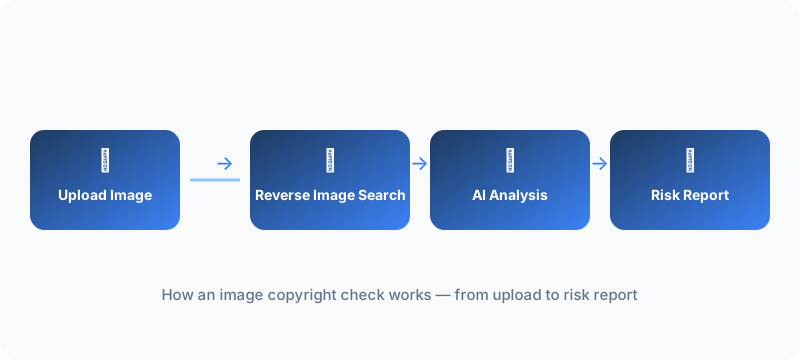
If you work with a large volume of images and would like to look for sources with even higher efficiency, you could consider ImageCopyrightChecker's tool.
4. Identify the License Type
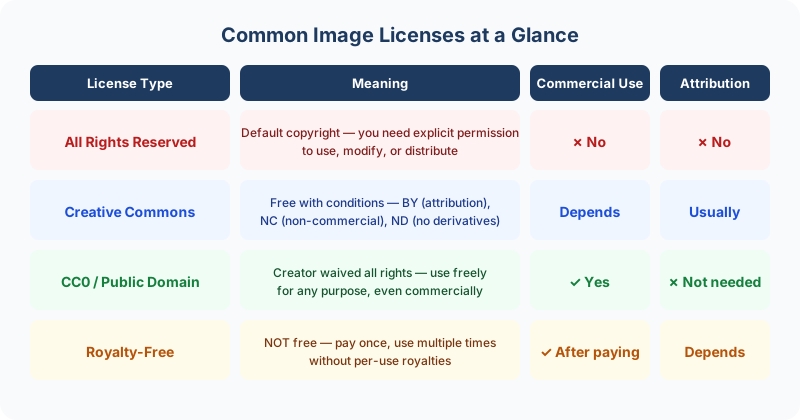
Once you've found the source, the crucial question is what the owner actually allows. Look for these common license indicators:
- All Rights Reserved — The default copyright status. You need explicit permission from the copyright holder for any use. Typical scenario: a news photograph or a designer's portfolio piece, where the owner licenses each use individually.
- Creative Commons (CC) — Free to use with certain conditions, such as attribution or non-commercial use only. Typical scenario: a Wikipedia illustration you can reuse in your blog post as long as you credit the author. The CC family ranges from simple attribution requirements to restrictions on commercial use and derivative works, so read the specific license rather than assuming. Creative Commons publishes detailed explanations of each variant.
- CC0 / Public Domain — Completely free to use for any purpose, no attribution required. Typical scenario: a scan of a centuries-old artwork whose copyright has expired, or a photograph the author deliberately dedicated to the public domain.
- Royalty-Free — Not free. It means you pay once and can use the image multiple times without additional per-use fees. Typical scenario: a stock photo bought from a paid library and reused across a client's website and social posts.
If your project prefers free, clearly licensed images, our list of free image sources covers platforms like Unsplash—home to 6 million+ photos—and explains the terms of each.
5. Check the U.S. Copyright Office Records
For images that may be formally registered, the U.S. Copyright Office maintains a free public catalog of registrations. Registration is not required for copyright to exist, but a registration record is strong evidence of who claims the work. Here's how to search it:
- Go to copyright.gov and open the Public Catalog under "Search Copyright Records."
- Search by the creator's name, the work's title, or a keyword.
- Filter the results by category—for example, "Visual Material"—to narrow the list to photographs and illustrations.
- Open the most relevant record and review its details: title, claimant, and registration date. Compare them against the image you're checking. If the claimant matches the name you found in the EXIF data or on the page where the image appeared, you have a consistent, well-documented trail.
Keep in mind that the catalog covers registrations filed in the United States, so an image registered only abroad may not appear. Use it as one signal among several, not as a definitive answer.
What to Do If You Find a Copyright Problem
If your checks turn up an image you don't have rights to, don't panic—you have straightforward options:
- Ask for permission. Contact the creator or rightsholder and request a license. A polite, specific request—saying where and how you want to use the image—is far more likely to succeed than a vague one, and creators sometimes agree to free use with attribution.
- Look for a free alternative. Swap in an image with a clear license from our list of free image sources.
- Purchase a license. If the image is on a stock platform, buy the license tier that matches your use—web editorial, commercial, print, and so on.
- Replace the image. When in doubt, remove it. Publishing an image you're unsure about is rarely worth the risk.
This guide is informational and does not constitute legal advice. For high-stakes commercial uses, consult a qualified attorney.
Ready to Check Your Images?
Upload your images to our copyright checker tool and get an instant verdict, with the source matches behind it and clear next steps. New users get 3 free checks on sign in.